


18Birdies Golf GPS Rangefinder
4.95.34K Reviews
App Specs
- Version
- 16.36.0
- Updated On
- License
- Free
- Downloads
- 1,000,000+
- Developer
- 18Birdies LLC
- Categories
- Sports
- Platform
- Android, iOS
Screenshots


 Analysis by AppCompare
When I’m choosing a golf app, I want more than a map on my phone. I want to know whether it can help me make a decision during a round, keep a useful record afterward, and stay out of the way when I need to focus. 18Birdies Golf GPS Rangefinder brings those jobs together, so it makes most sense for golfers who like having yardages, scoring, and practice information in one place rather than switching between separate tools.
What I’d want to decide before installing
The key question is how you actually play. If you regularly check distances, enter scores, and look back at your performance, a combined golf companion can be more convenient than a basic GPS utility. If you mainly want a paperless scorecard or only need an occasional yardage, the extra tracking and analysis may feel like more app than you need.
I’d also consider how much phone use you’re comfortable with during a round. GPS-based guidance depends on your device, and using location features can consume more battery than a scorecard alone. I’d start a round with a well-charged phone, keep a portable charger available for a long day, and avoid leaving the screen active when I don’t need it.
First Impressions
When I first downloaded the 18Birdies app, I was immediately struck by its clean and user-friendly interface. The design is intuitive, making it super easy to navigate even if you’re not the most tech-savvy person out there. After a quick sign-up process, you're greeted with a dashboard that provides all the essential details you need to get started. It's straightforward, and honestly, I felt like a pro golfer even before hitting the greens.
Features That Stand Out
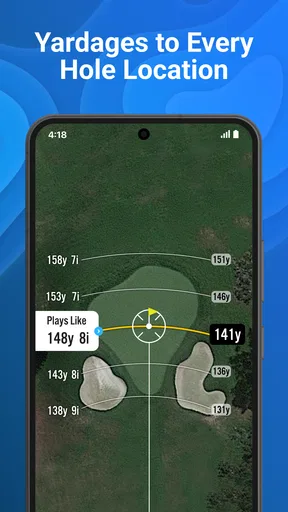
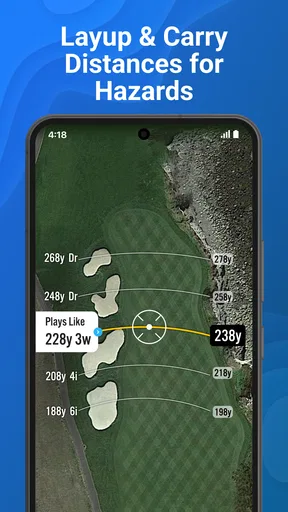
GPS Rangefinder: This is the bread and butter of the app. It's incredibly accurate, giving you precise yardages to greens, hazards, and landing zones. I was impressed with how quickly it updated as I moved around the course. No more second-guessing my shots!
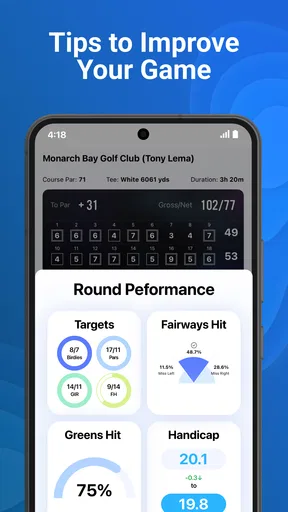
Digital Scorecard: Forget the pencil and paper. This digital scorecard keeps track of your strokes effortlessly. You can even track your stats over time, helping you see where you need to improve.
Social Features: Love a bit of friendly competition? You can connect with friends, share your rounds, and see how your scores stack up against others. It's a great way to add a social element to your solo rounds.
Worth Reading Before You Choose

Flipboard Shows What News Apps Must Do Beyond the Feed

Switching to Android Auto Means Rethinking Your Driving Routine

Google Calendar Makes a Crowded Week Easier to Manage

Ludo King Makes the Most of the Minutes Between Plans

Baby Panda World Brings Quick Play to Modern Phones, but Its Game Library Feels Busy

ESPN’s Live Game View Makes Following Close Games Easier
Making the GPS and scorecard work together
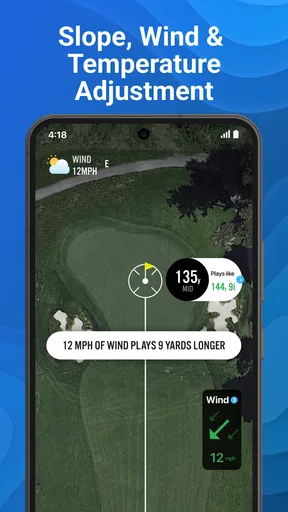
A practical way to use the rangefinder is to check a distance before choosing a target, then put the phone away and play the shot. A number is useful, but it doesn’t make the decision for you: lie, wind, obstacles, and your own reliable carry distance still matter. I’d treat the app’s yardage as one input, not an instruction to swing a club I don’t trust.
The scorecard becomes more valuable when I enter information consistently. Rather than trying to reconstruct a whole round afterward, I’d record each hole as I finish it. That keeps the task small and makes the record more dependable. If I’m playing with friends, I’d agree beforehand who is entering scores, so checking the phone doesn’t become a distraction for everyone.
For a casual round, I wouldn’t try to track every possible detail. A simple score record can make it easier to notice broad patterns over time; detailed shot tracking is more useful when I’m willing to keep up with it. The trade-off is straightforward: more entries can give you more to review, but they also demand more attention while you’re playing.
Game Improvement Tools
If you're serious about improving your game, 18Birdies offers some killer tools. The Practice feature lets you track your improvements over time and the Stats section breaks down your performance into digestible insights. It’s like having a personal coach available 24/7.
Shot Tracking is another invaluable feature. It allows you to record each shot you take, helping you analyze your game in detail. Over time, you’ll start to notice patterns and areas that need work.
Getting useful feedback without overtracking
For me, the best use of stats is to turn a vague frustration into a question I can act on. If a round felt messy, I might review the record and ask whether the trouble came from scoring, approach decisions, or inconsistent play. I wouldn’t expect one round to prove a lasting weakness. A few rounds recorded in a similar way are more helpful than a single unusually good or bad day.
Shot tracking is most worthwhile when I have a clear reason to do it: perhaps I’m working on course management or trying to understand where I lose confidence. It is less appealing when I’m playing a relaxed round and want to stay present. I’d choose a lighter approach on those days instead of turning every hole into a data-entry task.
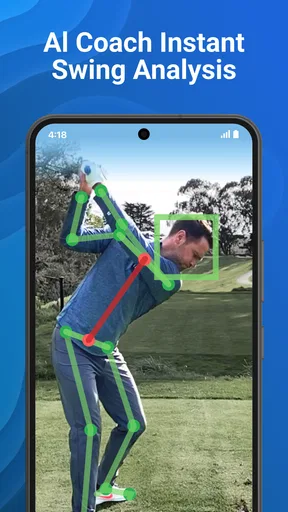
The AI swing analyzer is part of the app’s golf toolkit, but I’d keep my expectations sensible. An analysis feature can be a useful prompt for practice; it shouldn’t replace a qualified coach’s eyes or my own judgment about pain, comfort, and repeatability. If advice feels unclear, I’d take it to a lesson rather than rebuilding my swing around a single screen-based suggestion.
Usability and Performance
The app runs smoothly without any noticeable lag, which is crucial when you're trying to quickly get yardages during a game. Battery consumption is reasonable, though like most GPS apps, it will drain more than usual, so a portable charger is never a bad idea.
I found the app works seamlessly across both Android and iOS platforms, so no matter what device you're using, your experience will be consistent.
Where simpler alternatives may suit better
Compared with a dedicated rangefinder, a phone app brings scoring and round records into the same workflow, but it also means relying on a phone screen and battery. A standalone distance tool may be a better fit for someone who wants to glance at yardage and keep a phone tucked away. On the other hand, a paper scorecard is simpler and needs no app routine, but it won’t organize rounds into the same ongoing record.
There’s also a choice between an all-in-one golf app and separate tools for GPS, scoring, and practice. Separate options may suit golfers who already love a particular device or method. I’d favor one app when I want fewer moving parts and a connected record; I’d favor separate tools when a specific part of my setup matters more than convenience.
Who will get the most from it
I’d recommend it to golfers who play often enough to benefit from reviewing rounds, enjoy tracking their progress, or want social scoring alongside course information. It can also suit a newer golfer who wants one place to explore yardages and build a record, provided they’re comfortable learning the app at their own pace.
I’d skip it if I dislike using a phone on the course, don’t want to enter scores, or only need a quick distance check. It may also be a poor match for someone who expects an app to choose a club or fix a swing without personal practice. The helpful part is the information and record; the golfer still has to interpret them.
Cost, access, and the switching decision
As a free sports app from 18Birdies LLC, it is easy to try without paying upfront. Optional in-app purchases range from $2.99 to $99.99 per item, so I’d check what a paid option includes and whether I would actually use it before buying. The app is rated for Everyone. Its average rating is 4.8 from around 51,000 ratings, with over one million installs, which suggests broad interest but doesn’t tell me whether its workflow suits my own habits.
If I already keep rounds in another app, switching has a small but real cost: I need to get used to a new routine and decide whether I want to maintain my old records separately. I’d test the scorecard and GPS during a casual round before making it my main tracker. That gives me a chance to see whether checking distances feels quick and whether entering scores fits naturally between holes.
A typical use case is a weekend round with friends: I check a yardage before a shot, record the score at the end of the hole, and share the result afterward. On a practice-focused day, I’d use tracking more deliberately and review the patterns later, rather than pausing after every shot to inspect numbers. These two approaches make the app useful for different moods without requiring every feature every time.
Wrapping Up the Round
In the world of golf apps, 18Birdies Golf GPS Rangefinder is a hole-in-one. It combines functionality with a sleek design, making it a must-have tool for any golfer looking to improve their game. Whether you're a beginner or a seasoned pro, this app is designed to help you play better, track your progress, and have more fun on the course.
If you're ready to take your golf game to the next level, give 18Birdies a shot. You might just find it’s the edge you’ve been looking for.
My recommendation is to try it as a practical companion, not as a substitute for course judgment or coaching. If the combination of GPS, scoring, and review matches how you play, it can make your rounds easier to remember and your practice more focused. If you prefer a minimal setup, a simpler scorecard or dedicated distance tool may leave you happier.
Pros
- User-friendly interface for easy navigation.
- Accurate GPS for precise distance measurements.
- Wide range of golf courses available.
- Social features to connect with friends.
- Comprehensive stats tracking for players.
Cons
- Some features require a premium subscription.
- Battery drain can be significant during use.
- Occasional GPS signal issues reported.
- Limited offline functionality.
- Ads can be intrusive in free version.
FAQs for 18Birdies Golf GPS Rangefinder
What is 18Birdies Golf GPS Rangefinder?
18Birdies Golf GPS Rangefinder is a comprehensive golf app designed to enhance your game by providing accurate yardages, shot tracking, and advanced statistics. It features a GPS rangefinder, digital scorecard, and a large database of golf courses worldwide. The app is suitable for golfers of all skill levels looking to improve their performance.
Is 18Birdies available for both Android and iOS devices?
Yes, 18Birdies is available for download on both Android and iOS platforms. Users can easily find the app in the Google Play Store or the Apple App Store. The app is designed to run smoothly on a wide range of devices, ensuring a seamless experience for all golfers.
Does 18Birdies require a subscription for full access?
While 18Birdies offers a free version with essential features, a premium subscription unlocks advanced tools such as personalized club recommendations, deeper statistical analysis, and additional game modes. Users can choose between monthly and yearly subscription options to access these enhanced features.
How accurate is the GPS rangefinder in 18Birdies?
The GPS rangefinder in 18Birdies is known for its accuracy, offering precise yardages to greens, hazards, and targets. The app uses satellite technology to provide real-time data, which is regularly updated to ensure reliability. However, environmental factors may occasionally affect accuracy, as with any GPS-based tool.
Can I use 18Birdies to track my scores and statistics?
Yes, 18Birdies includes a digital scorecard and shot tracking capabilities. Golfers can easily input their scores and track various statistics such as fairways hit, greens in regulation, and putting performance. This data helps players analyze their game and identify areas for improvement over time.


